Today we have released the first version of uSync.AI, a free add-on that brings uSync to Umbraco.AI on Umbraco 17.
dotnet add package uSync.AI
It does two things. It syncs your Umbraco.AI setup between environments the same way uSync syncs everything else, and it gives Umbraco.AI agents tools that can run uSync.
The problem
Umbraco.AI keeps a lot of setup in the database. Connections, profiles, contexts, guardrails, prompts and agents all live there, and getting an agent working how you want takes a fair bit of trial and error.
Then you have to do it all again on staging, and again on live. By hand. And hope you clicked the same things in the same order.
That's exactly the job uSync was built for, so now it does it.
Syncing your AI setup
Install uSync.AI and the Umbraco.AI items get written to disk when you save them, in their own
folders in the uSync folder (AI-Connections, AI-Profiles, AI-Prompts, AI-Agents and so
on). They go into source control with the rest of your uSync files, and they import on the
next server like everything else.
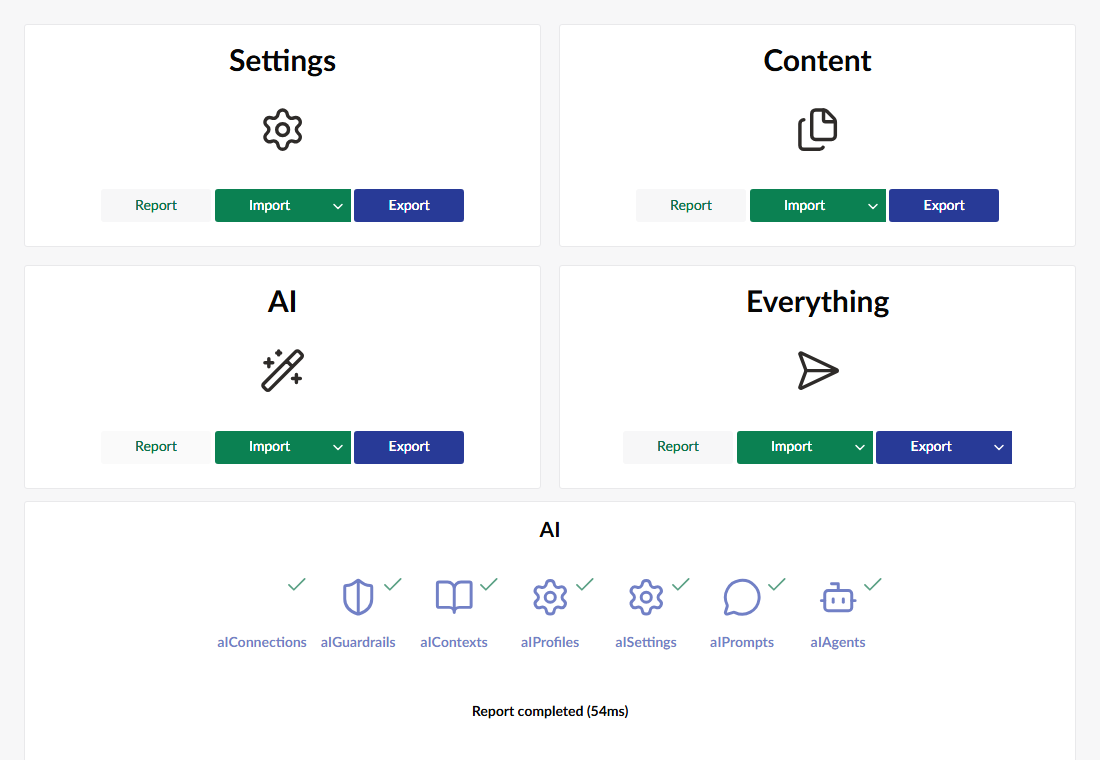
There is a new AI group on the uSync dashboard, so you can report, import and export just the AI items if you want to.
What's covered:
- Settings. Connections, profiles, contexts, guardrails and the Umbraco.AI settings.
- Prompts. Everything on a prompt, including its instructions, scope rules and the profile, contexts and guardrails it uses.
- Agents. The agent's instructions, contexts, profile, guardrails, allowed tools and tool scopes, and the per-user-group tool permissions.
Items keep the same Id on every server, and they import in order (connections first, agents last) so everything an agent needs is in place before the agent arrives. If something an item points at isn't on the target yet, the item still imports, without that link, and you get a warning. The next import puts the link back once the missing item is there.
What about API keys?
The obvious worry with putting AI connections in files is API keys ending up in git. By default they don't.
uSync.AI leaves out any setting the provider marks as sensitive, and any value that is already
encrypted. If you use a configuration reference ($Umbraco:AI:Secrets:OpenAIApiKey and the
like) that is synced, because it's only the name of where the key lives, not the key.
When a connection arrives on a server that already has a key, the existing key is kept. If the server doesn't have one yet, the connection gets a placeholder and a warning, and you enter the real key there once.
You can tighten or loosen this in appsettings.json if you need to:
{
  "uSync": {
    "AI": {
      "Connections": {
        "IgnoreEncrypted": true,
        "IgnoreSecretValues": true,
        "IgnoreSensitive": false,
        "IgnoreSettings": []
      }
    }
  }
}
Turning IgnoreSecretValues off writes API keys to disk in plain text. We'd leave it on.
Letting agents run uSync
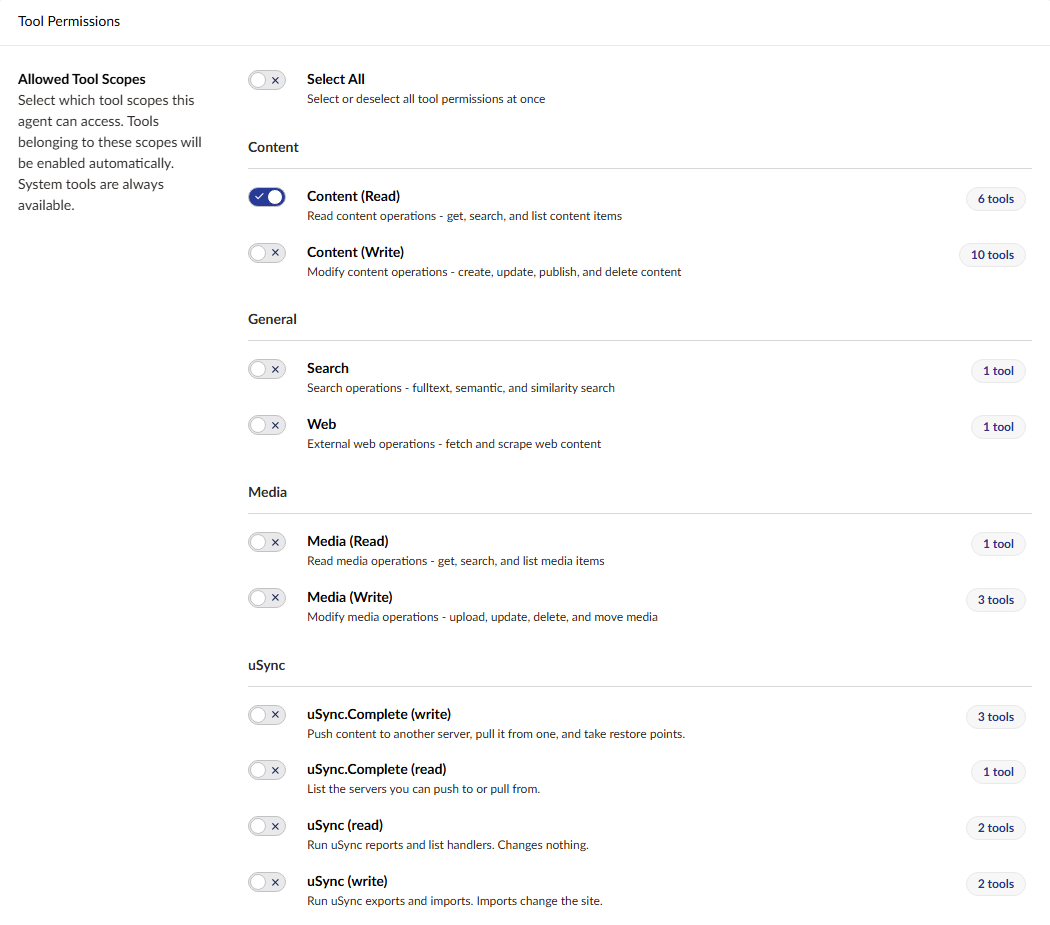
The other half is the other way round. uSync.AI.Tools adds uSync tools to Umbraco.AI, so an agent can list the handlers, run a report, export, or import.
So an editor (well, more likely a developer) can ask an agent "what would an import change?" and get the uSync report back as an answer.
We were quite careful with this bit, because an agent deciding to run an import is a bigger deal than a person pressing the button.
- Nothing is on by default. An agent only gets the uSync tools if you give it them, or their scope, in the agent's settings.
- It's checked against the user. Each tool checks the backoffice user the agent is acting
for. They need access to uSync, and imports need an administrator by default (you can relax
that with
RequireAdminForImport). The agent's settings can't override this. - You approve the big ones. Export and import ask the user to approve each call, and the prompt says what's going to run.
- No signed-in user, no tools. An agent run from a schedule or automation can't use them.
- One at a time. Only one uSync operation runs at once. A second one is refused, not queued.
uSync.Complete
If you use uSync.Complete, install uSync.Complete.AI instead. You get everything above, plus
two more things.
dotnet add package uSync.Complete.AI
Push and pull
Connections, guardrails, contexts, profiles, prompts and agents get Push to server… and Pull from server… in their actions menu, for users with the publisher's push or pull permission.
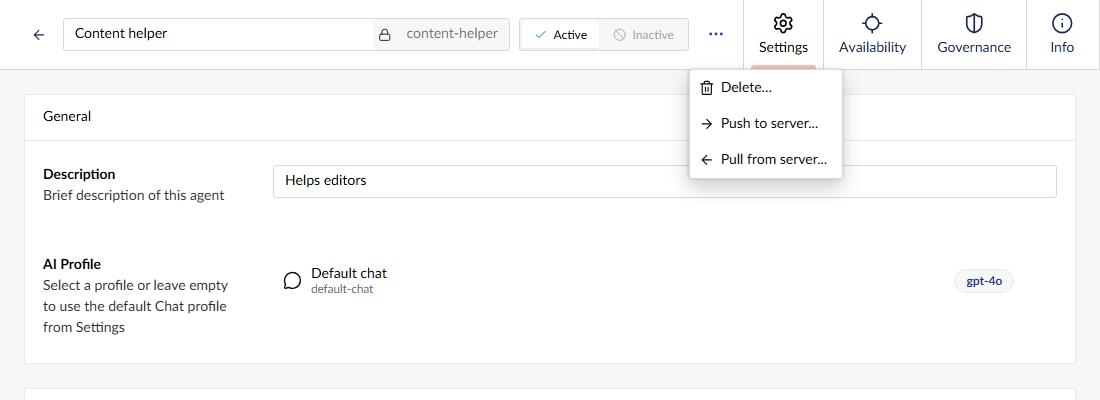
An item takes what it needs with it. Push an agent and its profile, that profile's connection,
and any contexts and guardrails they use all go too, whatever the publisher's "include
dependencies" setting says. (You can turn that off with AlwaysIncludeDependencies if you'd
rather follow the publisher.) API keys never travel, same as with files.
Publisher tools for agents
There are also agent tools for the publisher: list the servers you can push to or pull from, push a content or media item to another server, pull one in, and take a restore point.
They work one item at a time (optionally with its children, media and the settings it depends on). They never send the whole tree. The same rules apply as above: the tools are off until you give them to an agent, they check the user's uSync.Complete permissions, and the ones that change something ask for approval first, naming the server and the item.
The packages
uSync.AI is split up so you can install just the bits you use:
- uSync.AI. Installs the four packages below. Most sites want this one.
- uSync.AI.Sync. Connections, profiles, contexts, guardrails and settings.
- uSync.AI.Prompt. Prompts (needs Umbraco.AI.Prompt).
- uSync.AI.Agent. Agents (needs Umbraco.AI.Agent).
- uSync.AI.Tools. The uSync agent tools.
- uSync.Complete.AI. Installs
uSync.AIanduSync.AI.Complete. For uSync.Complete users. - uSync.AI.Complete. Push, pull and the publisher agent tools.
uSync.AI needs Umbraco 17.5+, Umbraco.AI 17.5.2+ and uSync 17.4.3+. The Complete packages also need uSync.Complete 17.5.0+ (and a licence for it).
Get it
uSync.AI is free and open source (MPL-2.0). It's on NuGet now.
dotnet add package uSync.AI
The code, the readmes for each package, and the issue tracker are all on GitHub, and you can see the release notes on our releases site. If you want to follow along, nightly builds go to nightly.jumoo.uk.
We honestly don't know yet how people are going to use agents with uSync, so if you try it, we'd love to hear how you get on.
Enjoy!