It has been a busy year for Translation Manager. We started 2026 on Umbraco v17, we are now on v18, and we have shipped 31 releases across v13, v17 and v18 so far this year, so a lot of new things have quietly landed.
Some of it has had a blog post, a lot of it hasn't, so this is a bit of a catch up on what has been added since the start of the year.
dotnet add package Jumoo.TranslationManager
Features of note
Translating the Library
Umbraco v18 introduced the Library, a place to keep reusable element content that isn't tied to a page in the content tree. Which is great, right up until you realise all that content also needs translating.
So with our v18 release, Translation Manager can now translate Library elements as well as documents.
It works pretty much exactly the way content translation does. You create a translation set, only now you get a choice of what kind of set you are creating, a content set or a library set.
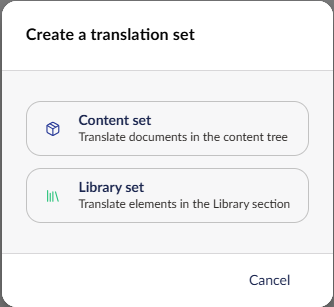
Point it at a folder in the Library, pick your languages, and off you go.
Everything you already know still applies:
- Auto translate on save, so elements go off to be translated as soon as an editor saves them.
- "Send to translate" and "Quick translate" from the element editor itself.
- Right click a Library folder and send everything underneath it in one go.
- The same job, approve and publish workflow you use for content.
Under the hood, library translations use the culture variant model, so the translations live as variants on the same element rather than as a copy somewhere else in the tree. That keeps the Library tidy, and means your blocks and reusable bits just pick up the right language when they get rendered.
Library translation needs Umbraco v18 and Translation Manager v18.
Translation Memory grew up
Translation Memory has been in Translation Manager for a while now. It stores the phrase pairs that come back from machine and AI translators, so the next time it sees the same bit of text it doesn't need to send it off again. Faster translations, smaller bills.
The problem was you couldn't really see any of it. You got a count per connector, and a "delete everything" button, and that was your lot. If a translator had got a phrase slightly wrong, that wrong phrase was going to keep coming back forever and there was very little you could do about it.
That's all changed. Translation Memory now has a proper management screen in settings:
- Browse and search everything stored for a connector, paged, so you can actually find the phrase you are looking for.
- Edit entries in place. Found a translation you don't like? Fix it, and every future translation uses your version.
- Delete single entries, rather than nuking the whole lot.
- Approved only filter, so you can look at just the memory that has come from content somebody has actually signed off.
- Copy memory between connectors. Trying out a new AI provider, or moving from one machine translator to another? You can bring your existing memory with you instead of starting from scratch.
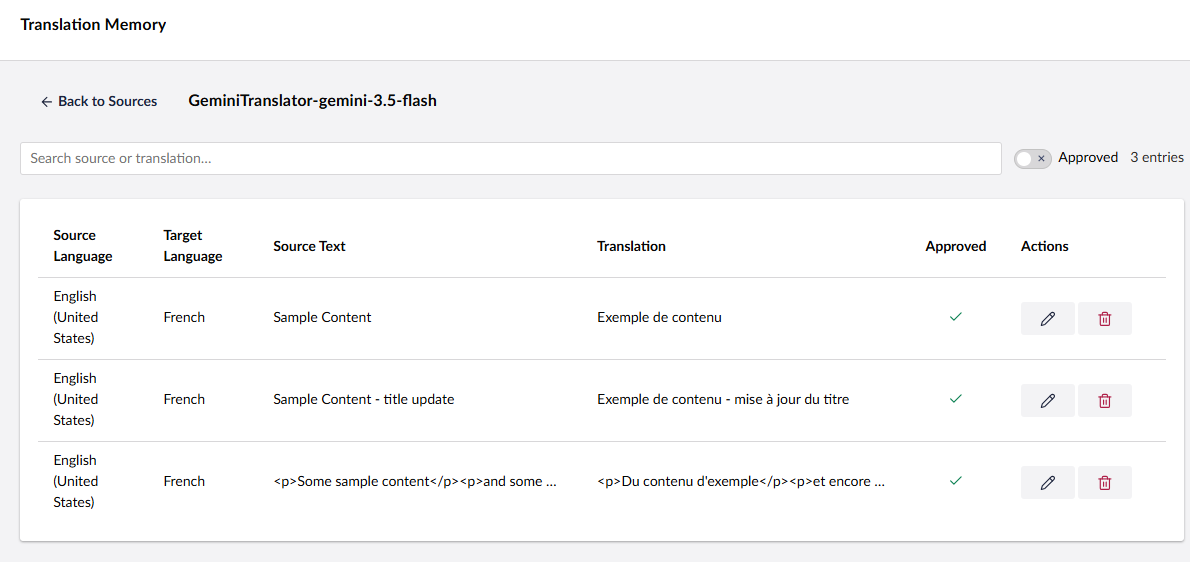
We also added batch memory support, so connectors that translate in batches (rather than phrase by phrase) can use memory too, and memory results are now passed back to the connector and shown in the UI, so you can see which bits of a translation came from memory and which were freshly translated.
And the rest
Plenty of smaller things landed too. Here they are in no particular order.
-
Translate in place. Translate a node's content into another language without setting up a translation set at all, overwriting it where it sits. Handy for one off jobs and for invariant doctypes. It's off by default, turn it on in settings if you want it.
-
Approve and publish are now separate permissions. Previously anyone who could approve a translation could also push it live. Now you can give a translator approve rights and keep publishing with your editors. (Worth a read of the release notes on this one if you have custom user groups, the mutating endpoints now check permissions properly too.)
-
Rich text editing of HTML values. Translation values that hold HTML now get a proper Tiptap rich text editor instead of a textarea full of raw markup. Much nicer if you ever need to tweak a translation by hand.
-
Lock connector on a set. A set's connector used to be the only option. Now it's just the default, and users can pick something else, unless you tick "Lock connector" to keep the old behaviour. Existing sets stay locked, so nothing changes until you decide it should.
-
One click translate setup. A much shorter route from "I have just installed this" to "I have translated something", along with a simplified job creation dialog and a cleaner quick translate view.
-
Batch connectors. A new
MachineBatchBaseclass for connector authors, for translation services that work asynchronously in batches rather than answering straight away. DeepL, Microsoft, OpenAI and Claude all support batch now (the last two via the AI connector). -
Per request throttling. Connectors can now throttle how fast they hammer an external API, which keeps the rate limits happy on big jobs.
-
Background processing rebuilt. The background queue now runs on Umbraco's recurring background job framework. That fixed a whole family of "No AmbientContext was found" errors on big jobs, and background items now run as the user who queued them, so permission checks behave. Not glamorous, but if you translate thousands of nodes at a time you will notice.
-
More languages in the backoffice. Translation Manager itself now speaks Danish, Dutch, Spanish, French and German as well as English. Which felt like something a translation package really ought to do.
-
Reworked settings page. Two column layout, clearer copy, and "Translate on save" is now called "Pending Translations", which is what everyone was calling it anyway.
-
Nicer node and job views. Real tab display names, properties grouped the way they are in the content editor, nested tab handling, proper browser titles, better progress bars, and an "Add all" button when you have a lot of languages to pick from.
-
Block editor improvements. Support for single blocks, nested blocks coming through properly, legacy rich text values folded into the translation flow, and a decent pile of fixes to how blocks merge back after translation.
Getting it
All of this is in the current v18 release, and most of the non Library bits shipped in the v17 line too.
dotnet add package Jumoo.TranslationManager
Our documentation has the detail on all of the above, and the changelog has the version by version breakdown if you want to know exactly when something appeared.