uSync.Complete 17.5 (Umbraco 17) and 18.2 (Umbraco 18) are out. They have the same features, and it's a big release. Publisher supports load-balanced servers, the Publisher browser and server list have had a lot of attention, and there's now a TimeMachine, so you can travel back in time!
For Umbraco 17:
dotnet add package uSync.Complete --version 17.5.0
For Umbraco 18:
dotnet add package uSync.Complete --version 18.2.0
Load balancing
17.5 / 18.2 adds support for running Publisher against load-balanced servers, including a load-balanced backoffice.
A push or pull is a series of requests, and each one builds on files the last one left on the server. So the whole series needs to reach the same server.
Server affinity
Most load balancers already have a way to pin a session to one server. They set a cookie (ARR affinity on Azure App Service, Application Gateway's own cookie, and so on) and route any request carrying it back to the same server.
Publisher now plays along. When a target server sets a cookie on its first response, Publisher remembers it and sends it back on every later request in the same push or pull. The whole operation stays on the server that answered first.
It's on by default, and you don't need to tell it the cookie's name. Against a single server that doesn't set cookies it does nothing at all.
If the requests do end up on different servers, Publisher logs a warning naming both servers and the step. To stop the push or pull at that point, turn on AffinityFailFast:
"uSync": {
  "Publisher": {
    "Settings": {
      "AffinityFailFast": true
    }
  }
}
A shared working folder
By default each server keeps its working files on its own disk. If your servers can see shared storage (a UNC share, a mounted volume, Azure Files), you can point uSync's working folder at it and every server sees the same files:
"uSync": {
  "WorkingFolder": {
    "Path": "\\\\shared-server\\usyncwork"
  }
}
It's read at startup, so it needs a restart to change.
Also in this area
- Temp folder cleanup on every server. The cleanup job now runs on each server in a load-balanced site.
- Quicker answers from unreachable servers. The server-to-server connection gives up straight away on a server it can't reach, and the server settings page tells you when that connection isn't available.
- Packs sent in parts. Pushes and pulls now move their packs between servers in parts, with progress for each one, so large syncs stay well inside request timeouts.
PackChunkSizeandPackChunkMaxBytesset the size of each part, and the defaults suit most sites. - Servers compare notes. Servers now tell each other what they support, so a push or pull can adapt to the version at the other end.
There is a full write-up on the load balancing docs page.
uSync.TimeMachine 🔥🛁⏰
Something changed on the site, and nobody is quite sure who did it, when, or what it looked like before. uSync can tell you what's different between your site and the uSync folder, but it can't tell you the history.
TimeMachine is new in 17.5 / 18.2, and it records what happens to your site as a timeline. "Kevin updated Home." "Kevin imported 59 changes." Each event lists the items it touched, with a property-level diff of what changed.
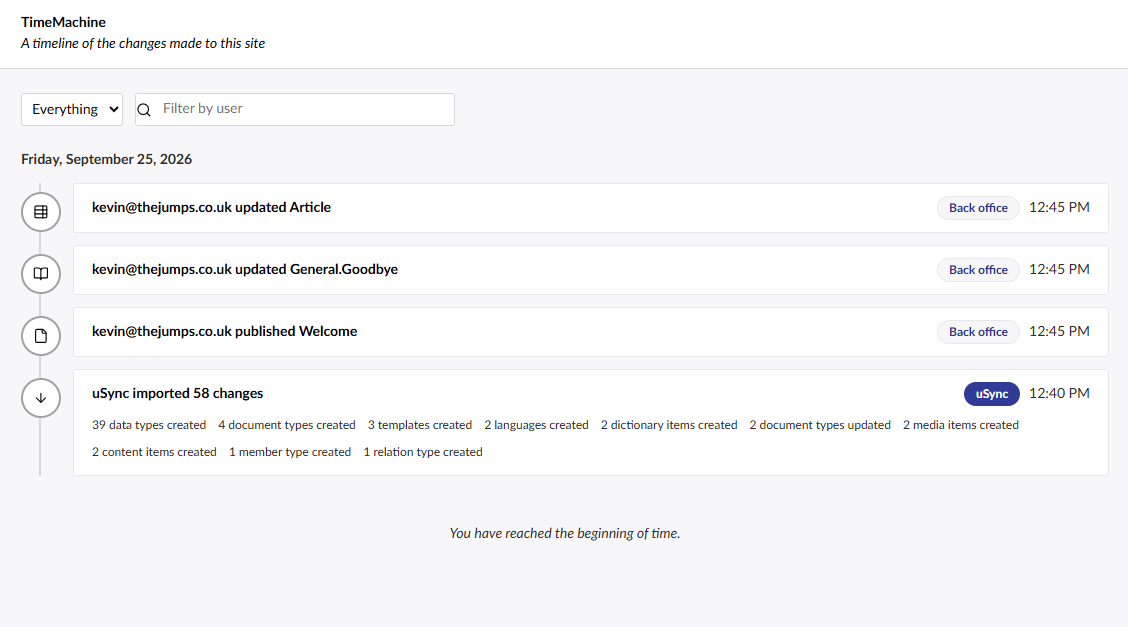
It groups things sensibly. A save in the backoffice is one event. A "save and publish" is one event, not two. A whole uSync import is one event, however many items it touched.
Rolling back
Pick an event, tick the changes you want to undo, and roll them back. TimeMachine shows you uSync's report of what will change before it does anything.
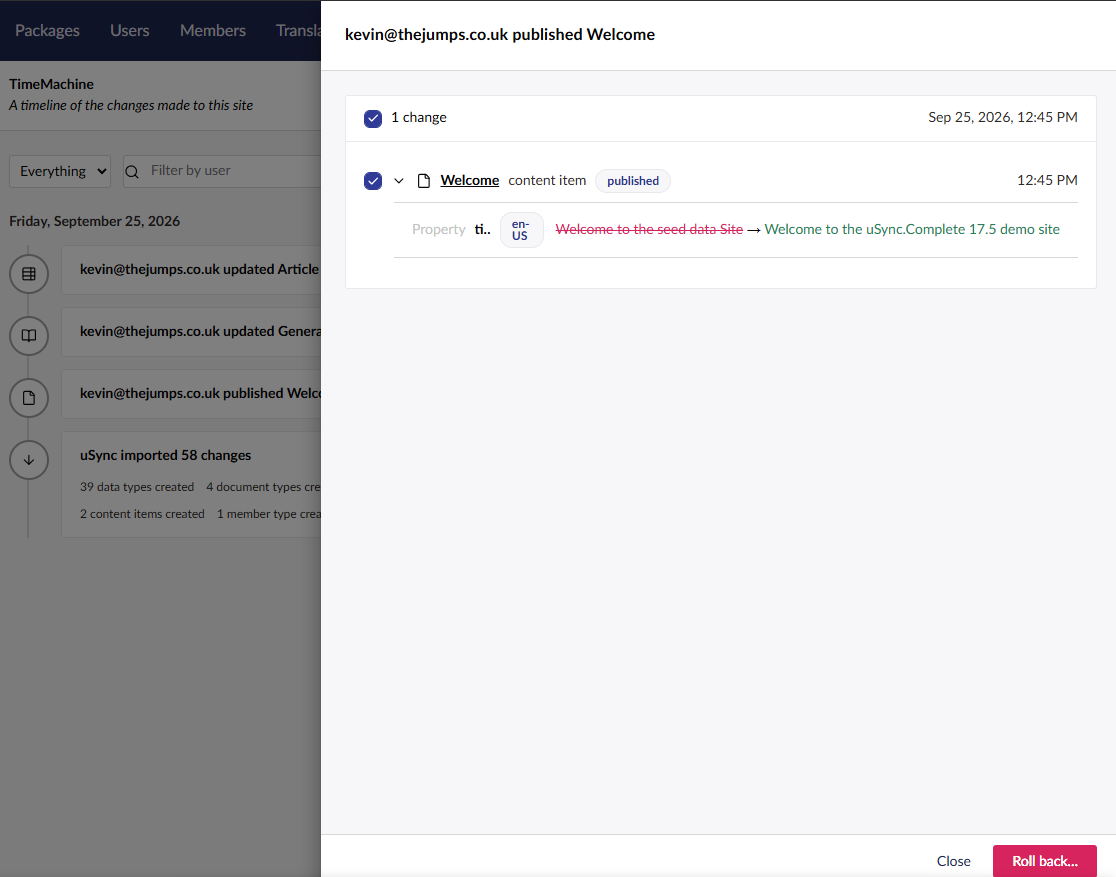
Under the hood, a rollback imports the "before" version of each item through uSync. If the change was a create, the rollback deletes the item again. A rollback is recorded as an event of its own, so you can roll that back too if you change your mind.
It covers the same things uSync does: content (including publish, unpublish, move and the recycle bin), media, blueprints, doctypes, data types, languages, templates, dictionary items, relation types, domains and webhooks.
Turning it on
TimeMachine is off by default. Recording serializes every item on every save, and we didn't want anyone upgrading and finding their saves slower without having asked for it. Switch it on in appsettings:
"uSync": {
  "TimeMachine": {
    "Enabled": true,
    "RetentionDays": 30
  }
}
It picks up the change without a restart. History older than RetentionDays is cleaned up automatically, because on a busy site those tables grow quickly.
A couple of honest caveats. Rolling back a media delete won't bring the file back if Umbraco has already removed it, because uSync's media XML doesn't carry the file. And blueprint updates can't be rolled back, because Umbraco doesn't raise the notification we'd need. TimeMachine tells you that rather than failing quietly.
The Publisher browser
The content and media browsers in Publisher have some new tools for finding your way around, especially on bigger sites.
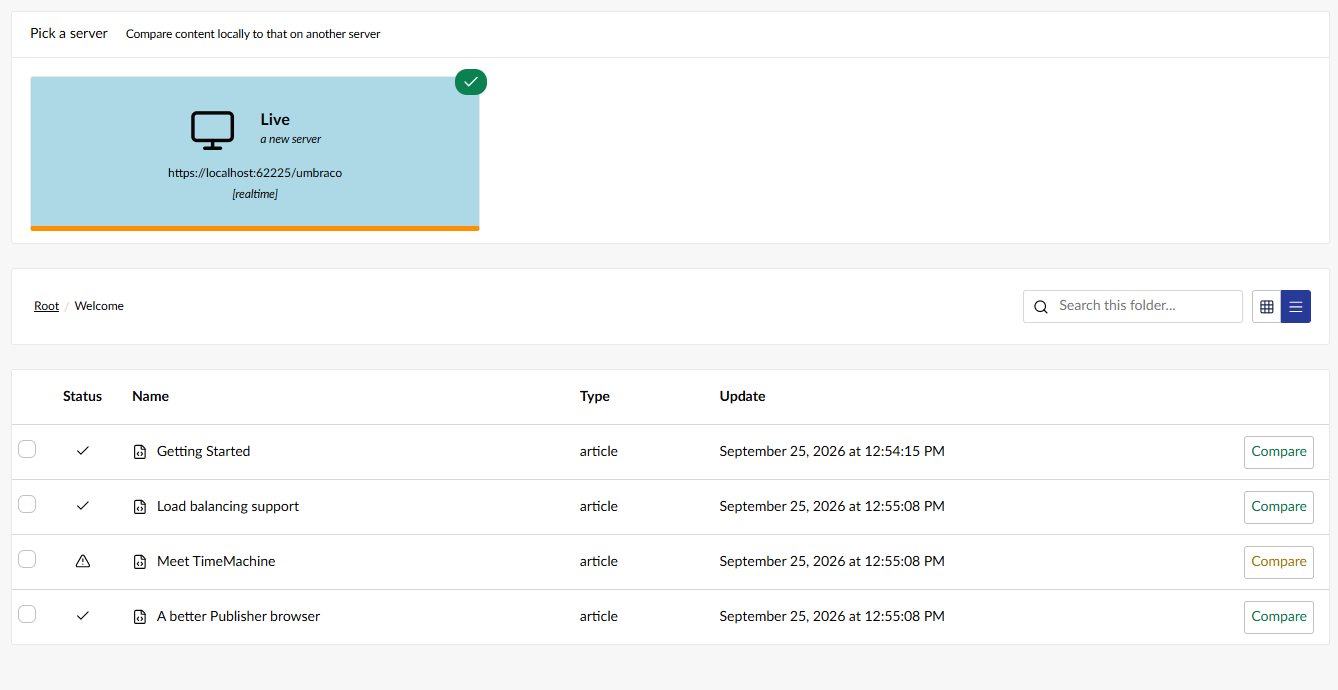
- List view. There is now a list view alongside the grid.
- Sync status on every item. Each item shows whether it's in sync, out of sync or missing on the other server, so you can see what needs moving before you move it.
- Paging, sorting and search. Large folders are paged. You can sort by name, type or last update, and search the current folder by name. Refreshing the page keeps your place.
Knowing which server you're on
If you have a dev, staging and live site open in three tabs, it's far too easy to do something on the wrong one. We already coloured the navbar with the server's colour. Now there is a server identifier in the backoffice header too, with the server's name, icon and colour. Click it to see the servers you can push to or pull from, whether each one is up, and a link to the same page on that server.
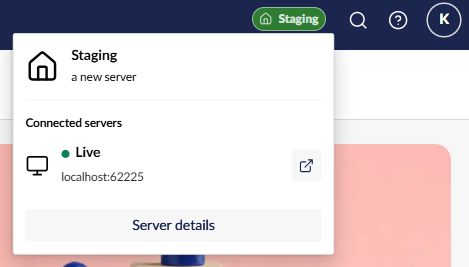
New servers get a random colour from the palette and the identifier turned on, with navbar colouring off (you can turn it back on in the server's settings). A site that isn't in its own server list shows as "Local". Existing servers keep whatever you had.
You can also now sort your servers. "Sort servers" on the Publisher node in the uSync tree sets the order they appear in, both in the tree and wherever you pick a server to push to or pull from.
Other bits
- Restore points and snapshots on big sites. Creating a restore point or snapshot on a large site could hang when the site was hosted out of process in IIS, because IIS gave up on the one long request. Content and media now export in pages across several requests.
- Exporter downloads. Exporter built the whole download in memory, and a pack that included media could be as big as the site. It now zips to disk and streams the file.
- Server json is back. The small "Server json" button in the footer of the Publisher dashboard, from the v13 version, is back. It shows your server setup as json, which you can save as
usync-servers.jsonin the root of a new site to seed its servers on install. - Missing labels. Snapshot labels were showing as raw keys, and so were a handful of item types in Publisher (domains, relation types, webhooks, users and user groups). Both are fixed.
- Smaller fixes. The Publisher browser and Compare dialog show the right status for every item in a folder, saving a server no longer loses a re-sort done while its settings were open, the unsaved-changes dialog has clearer choices, and the backoffice text has had a spelling and grammar pass.
- Latest uSync. Complete now builds on the latest uSync release for each version.
Getting it
uSync.Complete 17.5 and 18.2 are on NuGet now.
For Umbraco 17:
dotnet add package uSync.Complete --version 17.5.0
For Umbraco 18:
dotnet add package uSync.Complete --version 18.2.0
The full list of changes is in the release notes for v17.5.0 and v18.2.0, and the docs have the details on the new settings.
Enjoy!